A quote runs through your company.
Request, capture, costing, approval, quote sent. Everyone knows the process, nobody has measured it. That is where FLOWREFY starts.
Business processes, measured instead of guessed
Quotes, orders, approvals, invoices: Flowrefy measures the processes that run your company. You model a process, simulate it hundreds of times and see which step actually slows you down, priced in euros, as a range rather than a claim.

Here is the method on an example: a quoting process with six steps. Scroll, and it gets measured and improved step by step.
The method in detailFrom request to quote
6.1 days
on average, across six steps
Request, capture, costing, approval, quote sent. Everyone knows the process, nobody has measured it. That is where FLOWREFY starts.
FLOW · Measure first
Where does work pile up, where is data retyped by hand, where do people complain? The result is a list of processes worth looking at. No verdict yet, just the candidates.
A list, not a judgement
Each candidate gets a figure: what it costs today, per year, as a range rather than false precision. Only then are the candidates comparable at all.
If it can't be stated in euros, we don't touch it
The process runs hundreds of times in a Monte Carlo simulation. Now it shows which step actually blocks. And that is rarely the one people complain about loudest. This is where it is decided which single bottleneck counts.
The only FLOW step with no free calculator. Here, FlowVisual does the calculation.
The lever is weighed against what it costs. Sometimes the answer is that nothing is worth doing, and we say so before you buy anything.
“Doing nothing” is a result too
REFY · Then refine
Duplicate work, media breaks and waiting loops go first. That costs no licence and works immediately. Automate chaos and you get faster chaos.
Clean-up comes before software
Who decides, who executes, who is merely informed? Most bottlenecks are not capacity problems but unclear responsibility.
One decision, one person
Only now is technology touched: exactly one lever, connecting systems rather than replacing them. Excel stays Excel, SAP stays SAP.
One lever per cycle. Not three.
The same measurement runs again. The result is a before-and-after in euros, and an honest answer about where the bottleneck has moved to.
Fixed price · remote · re-measured
Step O says we simulate. Here is what that means — and why a spreadsheet cannot do it. Same process, four situations: watch the bottleneck move, and watch whether a person or a system is the limit.
The same five steps, four situations. One run draws one duration per step — one possible day. Five hundred runs make a distribution. Switch the situation and watch the bottleneck move.
An ordinary month. Nothing unusual happens — which is exactly what every process is designed for.
3 h 03 min
The figure everyone calculates.
—
—
This gap is where deadlines break.
Three worked processes — not client projects, but constructed sample analyses. They show which questions a measurement answers and what a finding looks like. In one of them we advise against buying.
See all analysesA packaging printer measures the path from incoming order to order confirmation. The bottleneck would be the credit check. The second finding would be a role two steps share, and it would only become an action once the first one is dealt with.
An engineering consultancy wants to digitalise leave requests. The measurement would side with the complaint and still not with the investment. The process would be slow, but cheap.
A plastics processor has every purchase above €500 signed by the managing director. The limit is old, the prices are not. Four out of five orders would pass through a gate that opens twice a week.
Four calculators, one result: a reasoned hypothesis about which process costs you most. Not a consulting deliverable, but a calculation from your own inputs, on screen immediately.
No login · No sales call · Immediate
R E F Y: with you, in a sprint
Your most likely bottleneck
A hypothesis from seven answers. It gets measured later.
FlowVisual · macOS & Windows
FlowVisual is the tool for the FLOWREFY method. You describe a process once, the way people tell it to you, and get four answers: the process manual with responsibilities (who decides, who does the work, who is kept informed), the workload per role, the business case for automation and AI in hours and euros, and the places where knowledge hangs on a single person. The Monte Carlo stress test shows where the bottleneck is and where it moves next.
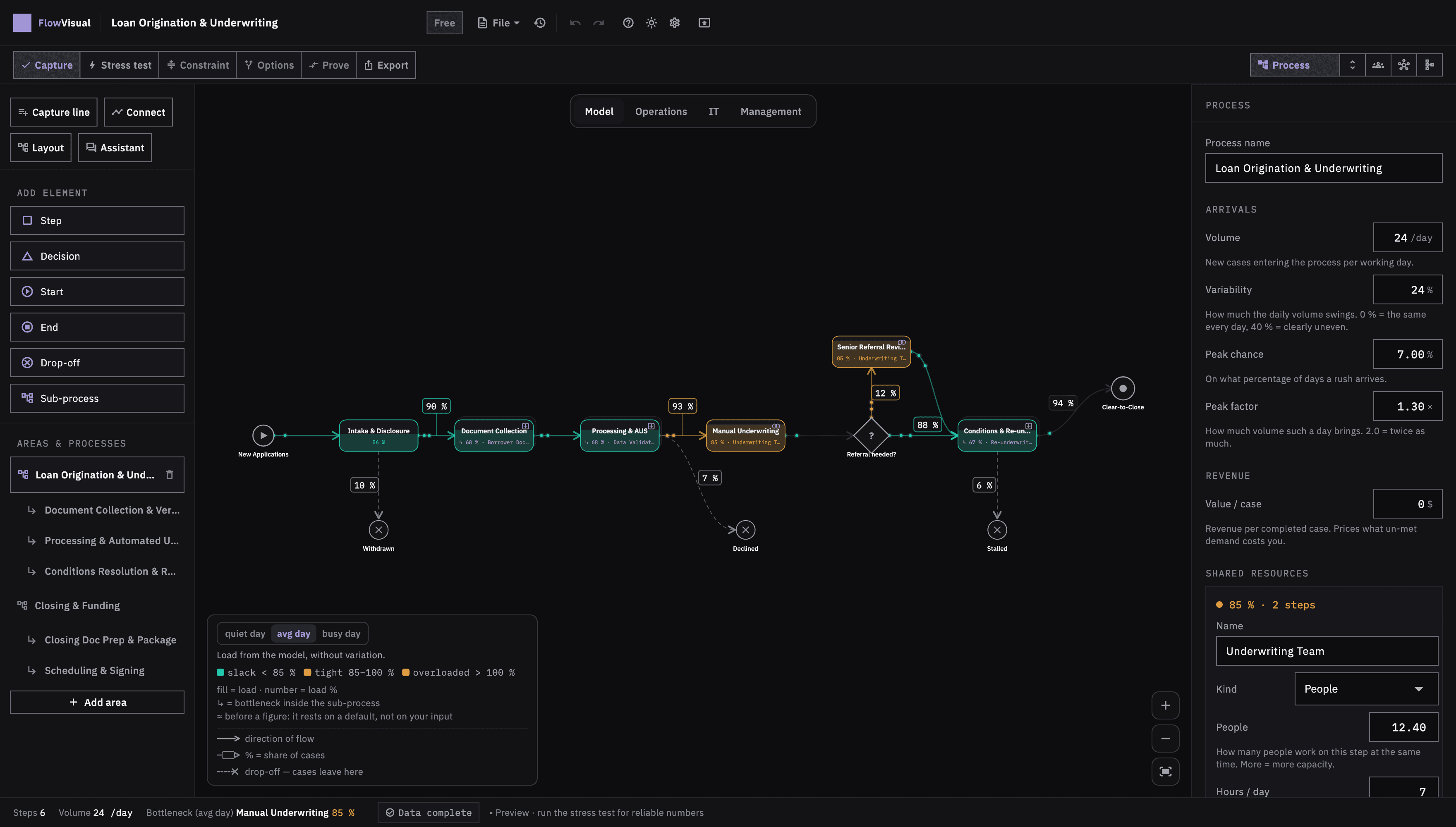
Nobody drags boxes in a workshop. You type while somebody talks — one line per step, Enter for the next. The chain wires itself:
Request arrivesPrice the quote @sales 20-40minApproval @boss 5min ?above 10kRework @sales !missing detailsDescribe the process once, the way it’s told in conversation: what happens, who, with what, how often, how long, what goes wrong.
The Monte Carlo stress test shows the bottleneck and where it moves next, plus the workload per role with the arithmetic.
Manual, business case and work packages as PDF for free; as Word and on your letterhead with Pro.
Runs locally · no cloud · capture, calculate, save and PDF for free
Guide: how to use FlowVisual in 45 minutesThree sentences you can hold us to. They can cost us business, and we accept that.
Client logos
That something worked at another company says nothing about your process. So we don't advertise with other people's mandates and we won't put logos in front of you. Your process gets measured from scratch — it is its own problem, not a repeat.
Lock-in
We build nothing you cannot run without us. No lock-in, no dependence on systems only we understand. If you leave, it keeps running. If you stay, it is because it pays off — not because you are stuck.
Selling the next phase
If the measurement shows no worthwhile lever, we say so and stop — instead of selling you the next phase. Two of our sample analyses show what such a result would look like. “Doing nothing” is a result too.
The calculators on this site are free. They are tools, not consulting. You run them yourself and the number is yours. Our work costs money. How much depends on the scope: one process, one department, or the whole company. We assemble the modules that scope needs and put a fixed price on it, not a day rate. It holds for the agreed scope and for a stated period; if the scope grows, we say so beforehand and not on the invoice. We start against a deposit.
The diagnosis calculates immediately: your most expensive bottleneck, in euros. The sprint takes 3–5 weeks and changes exactly one thing. Afterwards we run the same calculation again. Same formula, new numbers.
No. Excel stays Excel, SAP stays SAP. We connect what is already there. A system change is a separate decision with its own budget. If one is due, we will say so. It is not part of the sprint.
Before we start, the proposal states what each module is meant to achieve: a number, how it is measured, when it is measured. We both sign that, so there is nothing left to interpret afterwards. If the measurement shows no lever worth pulling, we say so and stop. We bill only for the work done up to that point.
Yes. You run the diagnosis yourself, online. We deliver the sprint remotely. We come on site when the process lives at the workbench rather than the screen.
What we measure, what an analysis returns, what it costs and when we advise against it. One sheet, made to be passed to whoever decides.
Start with the free diagnosis or download FlowVisual. If you want to speak to someone afterwards, we're reachable.
Remote · fixed price · result in euros


